
Computer Products of America Image Scanner Operator's Guide fi-4990C

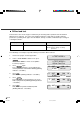
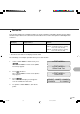

Table Of Contents
- Cover
- Inner Cover
- Revision Record
- Addresses
- IMPORTANT NOTE TO USERS
- Preface
- Conventions
- CONTENTS
- Chapter Index
- CHAPTER 1 COMPONENTS
- CHAPTER 2 INSTALLATION AND CONNECTIONS
- CHAPTER 3 OPERATING INSTRUCTION
- CHAPTER 4 DOCUMENT SPECIFICATION
- CHAPTER 5 SPECIFICATIONS
- CHAPTER 6 SETUP, BROWSE, AND TEST MODES
- Setup, Browse, and Test Modes
- Activating the Setup or Browse Mode
- Contents of the Setup or Browse Mode
- Transition of screens in setup mode
- Paper length check
- Doublefeed check
- Paper thickness setup
- Skew check
- IPC-3 mode
- Hopper height
- Paper separation level
- Drop-out color
- Background changeover
- Consumable counter
- Consumable counter reset
- Consumable alarm mode
- Buzzer
- Buzzer volume
- LCD contrast
- Picking speed
- TP_IF baud rate
- SCSI ID
- Product ID
- Pre-pick
- Pick start time
- Manual feed timeout
- Paper pick retry
- Paper feed retry
- Function key
- Setup mode lock
- Language
- White follower mode
- Interface board slot
- SCSI bus width setting
- Activating the Test Mode
- Contents of the Test Mode
- GLOSSARY OF TERMS
- INDEX
- Declaration of Conformity
- Back Cover
6-51
Test item Description
Offline feed test Scans sheets continuously for checking conditions of paper feeding.
* Endorser test Implements the Endorser‘s Print test.
Options Displays the options installed in the scanner.
Device life Displays the accumulative number of sheets fed and the accumulative number of hours for
lamps lit since the scanner has been installed, to estimate the life of the device.
Sensor auto adjustment Automatically adjusts sensors.
Offset auto adjustment Adjusts offset using adjustment sheets.
Operation panel test Tests functions of the LCD, LEDs, and buttons to check the operator panel.
Revision Display Displays the revision of the program EEPROM, VDC-C, Interface farmware.
Sensor status Displays the status of the sensors.
Sensor adjustment Changes the current and slice level of sensors to adjust the sensors.
white balance adjustment Adjust the Amp Gain Value for R,G, B when put the white paper in to scanner.
+5V voltage check Displays the voltage of +5 volts.
EEPROM edit Writes arbitrary data in EEPROM (address 00 to FF) to confirm or change the set values.
The test mode includes the user test functions listed in the following table. This section explains
“Offline feed test”, “Options”, and “Device life” which are necessary for users.
NOTE
If you need to use test functions other than “Offline feed test”, “Options”, and “Device life”, contact
your dealer.
The user test functions are as follows:
Contents of the Test Mode
* If the option is not mounted, the set up item for the option does not display on the screen and skips
to the next item.