COLOR Color Image Scanner fi-5110EOX Operator's Guide
Manuals
Brands
Fujitsu Manuals
Scanner
fi-5110EOX
81
82
83
84
85
86
87
88
89
90
70
ATTENTION
7.
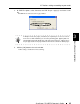
Select "File B" in the "Select File t
o Insert" screen and click the
[Select]
button.
⇒
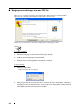
The "Insert Pages" window will appear.
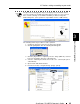
8.
Select "After" from the Location menu and "Last" from Page radio buttons,
then click [OK].
1
...
...
84
85
86
87
88
...
...
135