Scanner User's Manual
Manuals
Brands
Fujitsu Manuals
Scanner
IMAGE FI-5530C2
111
112
113
114
115
116
117
118
119
120
102
4.3
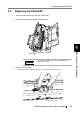
Replacing the Pick Roller
1.
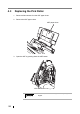
Remove all documents from the ADF pape
r chute.
2.
Remove the ADF paper chute.
3.
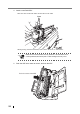
Open the ADF by pushing down the ADF button.
Be careful, the ADF cover may close and pinch your
fingers.
ADF paper chute
ADF button
1
...
...
116
117
118
119
120
...
...
179