Scanner User's Manual
Manuals
Brands
Fujitsu Manuals
Scanner
IMAGE FI-5530C2
51
52
53
54
55
56
57
58
59
60
42
3.
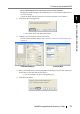
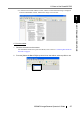
Click the [Start Batch Scan] button (
) on the toolbar.
⇒
A document is scanned with the scanner, an
d the scanned document image is dis
played
on the ScandAll PRO window, and th
en the image is saved
to file.
1
...
...
56
57
58
59
60
...
...
179