
- Funai Corporation 22"Digital LCDTV Owner's Manual



20
EN
O
PTIONAL SETTING
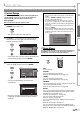
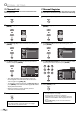
Channel List
The channel list function lets you remove undesired channels from the
channel registration list.
1
Press [SETUP] to display the main menu.
2
Use [Cursor K
/
L] to select “CHANNEL”, then press
[ENTER].
3
Use [Cursor K
/
L] to select “Channel List”, then press
[ENTER].
Channel
Channel
Autoscan
Channel List
Manual Register
Antenna
4
Use [Cursor K
/
L] to select the channel you want to
remove, then press [ENTER].
Channel List
Channel List
DTV 8
DTV 8
9
9
DTV 48
DTV 48
58
58
27
DTV 67
Ch Select Watch/Skip Back
BACK
ENTER
Highlight channels for Ch
Up/Down key selection.
DTV
DTV
6
6
The channel will be removed and the display of
the list lightens. You will not be able to select the
channel again using [CH K
/
L].
To reactivate a removed channel, use [Cursor K
/
L] and
press [ENTER], so the channel will be registered and the
display of the list darkens.
When you remove a major channel, its minor
channels are removed as well.
5
Press [SETUP] to exit.
Note:
• The channel with the “DTV” indicated on the display is
ATSC. Otherwise the channel is NTSC.
5
•
•
•
Manual Register
The manual register function lets you add the channels that were not added
by the auto channel scan due to the reception condition at the initial setting.
1
Press [SETUP] to display the main menu.
2
Use [Cursor K
/
L] to select “CHANNEL”, then press
[ENTER].
3
Use [Cursor K
/
L] to select “Manual Register”, then
press [ENTER].
Channel
Channel
Autoscan
Channel List
Manual Register
Antenna
4
Use [the Number buttons] to enter the number of the
channel you want to add, then press [ENTER].
Manual Register
Manual Register
For analog channels, select a
channel to register using number
keys.
For digital channels, you must
perform Autoscan function.
Register
Ch Change
11
Back
BACK
5
Press [SETUP] to exit.
Note:
• If set up completes successfully,
“Registered to the channel list” is displayed.
• If external input is used, it is not possible to register the
channel and “Unavailable” will be displayed on the TV
screen.
• By using [CH K / L], you can select the memorized
channels only.
5