
Installation Instructions

4
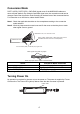
Conversion Mode
PORT1 (ORG), PORT2 (PPL), GND (BLK) signal cores of the NMEA0183 cables are
short-circuited (default). By cutting the specified signal core, the conversion mode can be
changed. Select the conversion mode according to the baud rate of the connected device.
For connection to an AIS device, select the AIS mode.
Note1: Check the applicable checkbox on the nameplate according to the conversion
mode selec
ted.
Note2: Wind vinyl tape around unused cores and fix the cores so that they do not touch
other signal cores or ground.
NMEA0183 cable
PORT1 (ORG), PORT2 (PPL), GND (BLK) signal cores of
the NMEA0183 cable are short-circuited (default).
NMEA0183 or PC, etc. connection cores
Cut the PORT1 (ORG) or PORT2 (PPL) signal core.
Wind vinyl tape around cores to insulate them.
Bind signal cores with vinyl tape.
Action Conversion Mode / Baud Rate
No action* Normal / 4800bps (default setting)
Cut the PORT1 (ORG) High Speed / 38400bps
Cut the PORT2 (PPL) AIS / 38400bps
*: To change the conversion mode to “Normal”, cut PORT1 and PORT2.
Turning Power On
No operation is required for the user to turn the power on. The power is supplied by Furuno
CAN bus line. The Power LED (yellow) flashes when the data converter is powered.
Power LED