
Computer Monitor User Manual


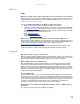
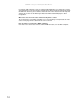


Table Of Contents
- HD2202 22-inch Widescreen LCD Monitor
- USERGUIDE
- Contents
- Using Your Gateway Flat-Panel Monitor
- Connecting the monitor
- Adjusting the angle
- Starting the monitor
- Adjusting monitor settings
- Changing Windows screen settings
- Power management
- Maintenace
- Troubleshooting
- FAQs
- General
- How To
- Technical
- Why do I see “noise” or “trash” on the screen?
- What is HDCP and how do I troubleshoot it?
- How does HDCP work?
- What happens if I lose signal to the display while watching a movie on a HDCP-equipped component?
- What is the cause if a movie starts and then slowly fades to static?
- How do I know if a component is HDCP compliant?
- Specifications
- Safety, Regulatory, and Legal Information

www.gateway.com
9
Video modes
Your monitor supports several video modes. If you do not use the best mode for the monitor, the
display image may look slightly “fuzzy.”
Mode Resolution (active dot) Horizontal frequency (kHz) Vertical frequency (Hz)
1 640x480 31.469 59.941
2 640x480 37.861 72.809
3 640x480 37.500 75.000
4 640x480 35 66.66
5 720x400 31.469 70.087
6 800x600 35.156 56.250
7 800x600 37.879 60.317
8 800x600 48.077 72.188
9 800x600 46.875 75.000
10 832x624 49.722 74.55
11 1024x768 48.363 60.004
12 1024x768 56.476 70.069
13 1024x768 60.023 75.029
14 1152x870 68.681 75.062
15 1152x864 67.5 75
16
17
1280x720 44.955 59.940
18
1280x800 49.702 59.810
1600x900 55.990 59.946