
Computer Monitor User Manual



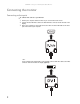
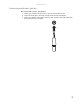
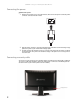
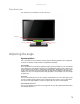
Table Of Contents
- HD2202 22-inch Widescreen LCD Monitor
- USERGUIDE
- Contents
- Using Your Gateway Flat-Panel Monitor
- Connecting the monitor
- Adjusting the angle
- Starting the monitor
- Adjusting monitor settings
- Changing Windows screen settings
- Power management
- Maintenace
- Troubleshooting
- FAQs
- General
- How To
- Technical
- Why do I see “noise” or “trash” on the screen?
- What is HDCP and how do I troubleshoot it?
- How does HDCP work?
- What happens if I lose signal to the display while watching a movie on a HDCP-equipped component?
- What is the cause if a movie starts and then slowly fades to static?
- How do I know if a component is HDCP compliant?
- Specifications
- Safety, Regulatory, and Legal Information

www.gateway.com
3
To connect audio source to your monitor:
1 Position your computer and the monitor so you can reach the back of each.
2 Connect the audio cable to the audio connector under the back of the display.
3 Ensure your computer is turned off. Connect the other end of the audio cable to the audio
port on the back of your computer.
Connecting audio input
(option)