
- GCC Elite Color 16 Series Printer User's Guide



6-8
GCC Elite Color 16 Series User’s Guide
High Capacity Feeder
NOTE:
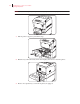
Replace the printer’s tray cover in the same manner.
12.
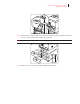
Insert the High Capacity Feeder’s lower paper tray in to the High Capacity Feeder.
13.
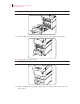
Push the paper tray until it stops.
NOTE:
Do not use excessive force on the paper tray.
14.
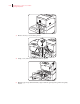
Replace the High Capacity Feeder’s upper paper tray and the printer’s paper tray in the
same manner.