
- GCC Elite Color 16 Series Printer User's Guide

1-10
GCC Elite Color 16 Series User’s Guide
Installation Procedure
1.
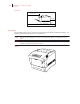
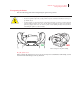
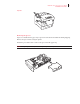
Gently pull out the paper tray until it stops.
2.
Hold the tray with both hands, lift the front up slightly and pull it completely out of the
printer.
NOTE:
Place the tray on a flat surface.
3.
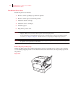
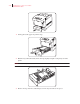
Remove the tape from the cardboard spacer in the tray and remove the spacer.