- GCC Elite Color 16 Series Printer User's Guide
Manuals
Brands
GCC Printers Manuals
Printer
16
81
82
83
84
85
86
87
88
89
90
2-28
GCC Elite Color 16 Series User
’
s Guide
T
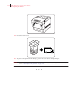
ransporting the Printer
9.
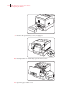
Remove the optional tray cover
, if equipped.
10.
Push up button ‘A
’
1
and fully open the front cover
2
.
11
.
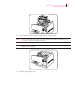
Open the paper outlet cover
.
1
...
...
79
80
81
82
83
...
...
196