
User manual

7
RECEIVER PANEL DESCRIPTIONS
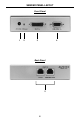
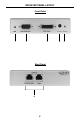
1 Equalization Trimpot
With auto-equalization switched off, use this adjustment trimpot for equalizing
and stabilizing the video signal over the distance selected (see instructions on
page 9).
2 RS-232 Output
This port outputs RS-232 signals that have been received from the Sender unit.
Please see page 5 for complete details on the serial communication features
that are used on this product.
3 DVI Output
Connect the display to this port.
4 5V DC Power Supply Input
This LED will become active once the included 5V DC power supply is properly
connected between the unit and an open wall power socket.
5 Power LED Indicator
The LED lights red when power is applied to the Receiver unit.
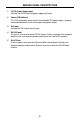
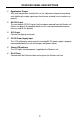
6 RJ-45 Ports
Connect both the Ethernet cables arriving from the Sender unit here.