
User's Manual


i
Table of Contents
Table of Contents .................................................................................. i
1 Getting Started ............................................................................... 1
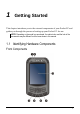
1.1 Identifying Hardware Components ...................................................... 1
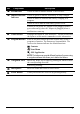
Front Components ............................................................................... 1
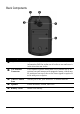
Back Components ............................................................................... 3
Left-Side Components ......................................................................... 4
Top Components ................................................................................. 5
Bottom Components ............................................................................ 5
1.2 Getting Your Device Ready for Use .................................................... 6
Installing the Battery ............................................................................ 6
Performing Initial Startup ..................................................................... 7
Connecting to AC Power and Charging the Battery ............................ 8
1.3 Synchronizing with Your Computer ..................................................... 9
Installing ActiveSync or WMDC ........................................................... 9
1.4 Using an SD/SDHC/MMC Card ......................................................... 11
2 Basic Skills ................................................................................... 12
2.1 Power Saving and Turning Off .......................................................... 12
Backlight Off ...................................................................................... 12
Entering the Suspend Mode .............................................................. 12
Turning Off ......................................................................................... 12
2.2 Using the Stylus ................................................................................. 13
2.3 Using the Navigation Stick ................................................................. 13
2.4 Today Screen .................................................................................... 14
Landscape View ................................................................................ 14
2.5 Navigation Bar and Toolbar ............................................................... 15
2.6 Running Programs ............................................................................. 16
2.7 Shortcut Menus .................................................................................. 16
2.8 Notifications ....................................................................................... 17