
manual

4 How does GFI MailEssentials work? Getting Started Guide
2.2 Outbound mail filtering
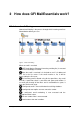
Outbound mail filtering is the process through which email sent by
users within a company is processed before it is sent out.
Figure 2 - Outbound mail filtering
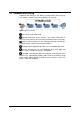
User creates and sends email.
Remote commands check executes any remote commands in
email if any are found. If none are found, email goes to the next stage.
Email is next checked to see if it should be archived. If archiving is
enabled, email is saved in the archiving database.
If configured, the applicable disclaimer is next added to the email.
Email is checked for any mail monitoring which may apply and
action is taken according to any rules configured.
If enabled, auto-whitelist adds the recipient‟s email address to the
whitelist. This automatically enables replies from such recipients to go
to the sender without being checked for spam. After this check, the
email is sent to the recipients.