
User`s manual

- 25 -
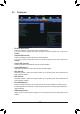
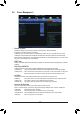
` GFXConguration
& Primary Video Device
Species the rst initiation of the monitor display from the installed PCI Express graphics card or the onboard
graphics.
IGD Video Sets the onboard graphics as the rst display.
NB PCIe Slot Video Sets the PCI Express graphics card on the PCI Express slot controlled by the
North Bridge as the rst display. (Default)
& Integrated Graphics
Enables or disables the onboard graphics function.
Auto The BIOS will automatically enable or disable the onboard graphics depending on
the graphics card being installed. (Default)
Disabled Disables the onboard graphics.
Force Always activates the onboard graphics, whether or not a PCI Express card is
installed.
& Gnb HD Audio
TEnables or disables the onboard HDMI audio function. (Default: Enabled)
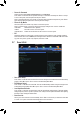
` SATAConguration
& OnChipSATAChannel
Enables or disables the integrated SATA controllers. (Default: Enabled)
& OnChipSATAType
Allows you to decide whether to congure the SATA controller integrated in the Chipset to AHCI mode.
IDE Congures the SATA controller to IDE mode.
AHCI Congures the SATA controller to AHCI mode. Advanced Host Controller Interface
(AHCI) is an interface specication that allows the storage driver to enable
advanced Serial ATA features such as Native Command Queuing and hot plug.
(Default)
& PORT0HotPlug~PORT1HotPlug
Enables or disable the hot plug capability for each SATA port. (Default: Disabled)
& SATAPoweronPORT0~SATAPoweronPORT1
Enables or disables each SATA port. (Default: Enabled)
` SuperIOConguration
This section provides information on the super I/O chip and allows you to congure the serial port and
parallel port.
& Serial Port A
Enables or disables the onboard serial port. (Default: Enabled)
& Parallel Port
Enables or disables the onboard parallel port. (Default: Enabled)
& Device Mode
This item is congurable only when Parallel Port is set to Enabled. Selects an operating mode for the
onboard parallel (LPT) port. Options are: Standard Parallel Port Mode (Default), EPP Mode (Enhanced
Parallel Port), ECP Mode (Extended Capabilities Port), EPP Mode & ECP Mode.