
User manual User Manual


GH-625XT
Page 22
6.2 SETTING
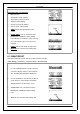
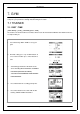
6.2.1 AUTO HOLD
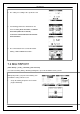
[MAIN MENU] > [ACTIVITY]> [SETTING] > [AUTO HOLD]
1. The Auto Hold function allows you to pause
the timer automatically when you stop moving
or your speed falls below a certain value.
2. When the timer is paused, the data is not
recorded. Thus the average speed and
calories calculation coul d be more accurate.
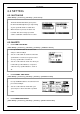
6.2.2 ALERTS
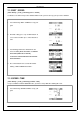
A 6.2.2-1 TIME / DIST AL E RT
[MAIN M E NU] > [ACTIVITY] > [SETTING] > [ALERTS] > [TIME/DIST ALERT]
1. Use Up and Down button to select the item
and press OK to modify it.
2. You can set the a l arm to sound once when the
specified time is reached, or repeat to sound
on every specified time, or turn it off.
3. You can set the alarm to sound once when you
reached the specified di s tance, or repeat to
sound on e v ery specified d i stance, or turn it
off.
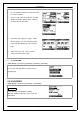
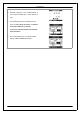
A 6.2.2-2 SPEED / PACE AL E RT
[MAIN M E NU] > [ACTIVITY]> [SETTING] > [ALERTS] > [TIME/DIST ALERT]
1. Use Up and Down button to select the i t e m and
press OK to m o di f y it.
2. You can set the alarm to sound when your
speed or pace is above or be l ow a specified
value.
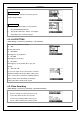
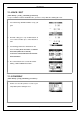
A 6.2.2-3 HEART R ATE ALERT
[MAIN M E NU] > [ACTIVITY]> [SETTING] > [ALERTS] > [HEART RATE ALERT]