
User manual User Manual


GH-625XT
8.2 ROUTES
8.2.1 LIST ALL
[MAIN M E NU] > [NAVIGAT I O N] > [ROUTES] > [LIST ALL]]
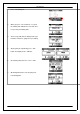
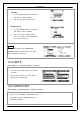
1. Get routes data f r om softwa r e ‘’Traini n g Gym Pro
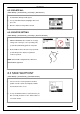
2. The map information of routes will show on the
display for your guiding. Select ‘’FOLLOW’’ to get
training. It will guide you automatically. You may
press ’’ENTER’’ or ‘’ESC’’ to go next or last
waypoint
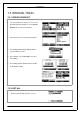
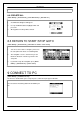
3. Chose ‘’ Backward’’ or ‘’ Forward’’ to start your
route.
4. DO YOU RECORD RUNNING DATA ? Press
YES
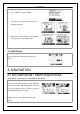
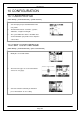
5. The screen will show map. Press ‘’Page button’’
display the distance and time for you to reach
destination on the right part of screen. The
direction of destination waypoint is shown by the
arrow sign of the compass.
NOTE: For firmware version 2.02 or ab o v e, please
use Training Gym Pro Ver 1.6.7 or above to transfer
ROUTE to de v ice.
Page 34