
User manual User Manual

GH-625XT
Page 8
PG (Page)
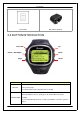
Switch between the screens of “Menu mode”, “Location m o d e”, “Speedometer
mode” and “Map mode”.
Up / Down
To move upward/downward for highlighting an item.
In Speedometer mode, press to switch bet we en two views.
In Map mode, press to zoom in or zoom out.
OK / Enter
Press to enter the highlighted item.
Press to confirm data entry or feature selection in Menu mode.
In Speedometer mode, press to start/stop the timer.
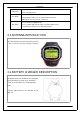
3.3 ANTENNA INTRODUCTION
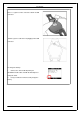
The GPS antenna is located in the lower part of the
d ev i ce. L et it face to the sky f o r a better reception.
3.4 BATTERY CHARGER DESCRIPTION
GH-625XT operates by a built-i n L i-ion rechargeable
battery. A battery icon shown on the left bottom
corner of screen indicates the remaining battery
power.
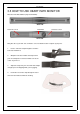
Inside the USB socket, there is a small "bar" on the
right side.