
User Guide

5
Product Layout
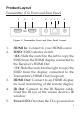
Transmitter (TX) Front and Rear Panel
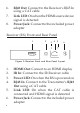
1. HDMI In: Connect to your HDMI source
2. EDID: EDID selector switch
• RX: Slide the switch to the left to copy the
EDID from the HDMI display connected to
the Receiver's HDMI Out
• TX: Slide the switch to the right to copy the
EDID from the display connected to the
Transmitter's HDMI Out (Loopout)
3. HDMI Out: Connect to an HDMI display
for local monitoring of the remote display
4. IR Out: Connect to the IR Blaster cable.
Point the IR eye at the source device's IR
window
5. Power LED: On when the TX is powered on
1
23 456
7
8
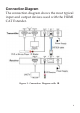
Figure 1: Transmitter Front and Rear Panel Layout