
User's Manual

Walgreens Installation Guide
G-1-2002-2B
Walgreens Installation Guide 2B.doc
Use or disclosure of this document is covered under the Non-Disclosure Agreement executed between the reader and Goliath Solutions,
LLC. This document and the information contained herein are privileged and should only be viewed by expressly authorized parties.
5/27/2008 Page: 2-61
Post Mount Procedures:
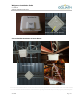
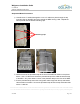
1) Run the 36 inch cable tie through the top mounting clips on the MEU. The front of the
MEU with the ports must be facing away from the post.
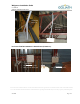
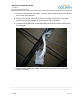
2) Secure the 36 inch cable tie around the post. If the post is larger than 36 inches then
use two 36 inch cable ties attached together to mount the MEU on the post. After the
MEU is mounted, trim off the excess part of the cable tie.
3) Attach the coaxial cables to the MEU. All excess cable should be secured in a minimal
service loop using cable ties.
4) After all of the coaxial cables are connected to the MEU and all of the Tx/ATA and
Rx/ARA are installed connect the power cable to the MEU.
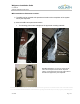
5) The bottom of the MEU with coaxial cables attached should be about 6 inches above
the ceiling grid.
6) Attach a Goliath Solutions grid label sticker on the drop ceiling grid to indicate the
location of the MEU.
Front
Top Mounting Clips