
User's Manual




Walgreens Installation Guide
G-1-2002-2B
Walgreens Installation Guide 2B.doc
Use or disclosure of this document is covered under the Non-Disclosure Agreement executed between the reader and Goliath Solutions,
LLC. This document and the information contained herein are privileged and should only be viewed by expressly authorized parties.
5/27/2008 Page: 2-33
4) This step is only required with a free standing communications cabinet in the
Pharmacy.
a) Follow the Pharmacy access policy located in Chapter 1 under the Walgreens
Environment Section.
The CIT must always be escorted by a Pharmacist when
in the Pharmacy
.
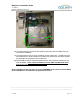
b) Open the communications cabinet.
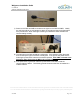
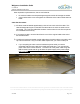
c) Install the Power brick and the 6 foot power cord at a location that will reach the
CMU location and the dedicated 24-hour power outlet. Plug the power cable into
the power brick. Do not plug the power cable into the designated power outlet at
this time.
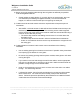
d) Pull the CMU/MEU low voltage end of the power brick to the CMU location and
connect it to the input power port on the CMU.
Be certain that the CMU power
switch is in the OFF position.
e) Connect the provided network patch cable to the CMU and then to the designated
port on the switch. If the designated on the switch is not available, then just
connect the network patch cable to the CMU. A tech from Walgreens will connect
the patch cable to the switch..
f) Plug the CMU/MEU power supply cable into the designated 24-hour uninterrupted
power outlet.
Be certain that the CMU power switch is in the OFF position.
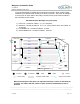
5) Temporally place the MEU near the CMU location.
6) Using a 12 foot CMU/MEU power cable from the Hot Spare Kit and the gender
changer cable connect the power cable to the output power port on the CMU and the
MEU power input port.
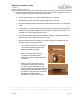
CMU
Power Brick