
User's Manual




Walgreens Installation Guide
G-1-2002-2B
Walgreens Installation Guide 2B.doc
Use or disclosure of this document is covered under the Non-Disclosure Agreement executed between the reader and Goliath Solutions,
LLC. This document and the information contained herein are privileged and should only be viewed by expressly authorized parties.
5/27/2008 Page: 2-37
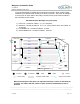
In the second example, the MEU will be mounted on the post in Aisle 4 and the CMU
installed by the network switch located in the store’s photo lab. The power for the MEU
is coming from an open outlet in the ceiling near the security screen that is located by
the front entrance of the store.
Back Stock Room (Example using four pulls)
1) Front Pull – consists of cables 1, 3, 4, 21, and power.
2) Back Pull – consists of cables 9, 10, 11, 12, 23 and pull the stock room cables 15,
16, and 24.
3) First Middle Pull – consists of cables 2, 5, and 6.
4) Second Middle Pull – consists of cables 7, 8 and 22.
When performing the cable pulls it is imperative that they are done as efficiently as
possible. This means that the number of pulls should be minimized as much as
possible.
Employee
Room
Pharmacy
Tech Room
Coolers
Employee Lockers
Office
Photo
Front Entrance
Cosmetics
Registers
Power
Aisle 1
Aisle 2
Aisle 3
Aisle 4
Aisle 5
Aisle 6
Aisle 7
Aisle 8
Aisle 9
23
21
1
3
4
5
22
9
2
10
11
12
8
7
6
Restrooms
Stock Room
=Receiver =Transmitter =CMU =MEU =Power
=Power Cable =Multiple Coaxial Cables =Single Coaxial
Cable
Receiving
Door
16
24
15