
User's Manual

Walgreens Installation Guide
G-1-2002-2B
Walgreens Installation Guide 2B.doc
Use or disclosure of this document is covered under the Non-Disclosure Agreement executed between the reader and Goliath Solutions,
LLC. This document and the information contained herein are privileged and should only be viewed by expressly authorized parties.
5/27/2008 Page: 2-46
CMU/MEU Power Cable:
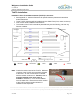
1) The CMU/MEU Power Cable will be pulled to one of three locations. The approved
locations are:
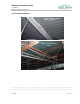
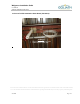
The first choice is an open outlet in the ceiling near the security screen that is
located by the front entrance of the store. Use this location if it is available. This
location requires a CMU/MEU Power Supply.
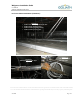
The second choice is the output power port on the back of the CMU. This location
does not use a second CMU/MEU Power Supply to power the MEU.
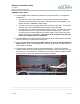
The last option is by the Communications area in the store. The store will normally
have either a tech room or a phone block located in the stock room. This area
normally has open uninterrupted 24-hour power outlets. Only use this area if the
first two options are not available.
This location must be approved by the Help
Desk prior to beginning of the installation.
2) The CMU/MEU Power cable should be pulled with the other cables pulled to the same
section of the store. Normally with the front pull.
3) Remember
the power source for the MEU must be an open uninterrupted 24-hour
power source.
It can not be plugged into a cube tap, power strip or a UPS used by a
LAN cabinet or computer.
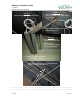
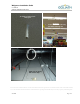
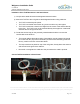
4) The power brick must be secured at it designated location. Use Velcro inside the
Catalina cabinet and if the power supply is in the ceiling it must be secured to roof iron
with cable ties. If the power brick is installed on the roof iron install a Goliath Solutions
grid label sticker on the drop ceiling grid to indicate its location.