
User's Manual

Walgreens Installation Guide
G-1-2002-2B
Walgreens Installation Guide 2B.doc
Use or disclosure of this document is covered under the Non-Disclosure Agreement executed between the reader and Goliath Solutions,
LLC. This document and the information contained herein are privileged and should only be viewed by expressly authorized parties.
5/27/2008 Page: 2-48
Tx/ATA Installation:
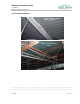
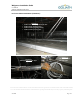
Installation of the Transmitter antennae (Tx/ATA) in the store:
See Appendix A - Antenna Placement for specific antenna placement instructions
and/or restrictions.
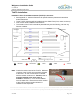
Three Tx/ATA antennas will be installed over the Sales Floor (front, center, and rear).
One Tx/ATA will be installed in Stock Room.
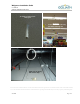
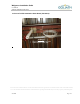
The location of the Tx/ATA should be placed directly over the flooring, not over any
fixtures or tables.
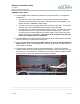
Example of Tx/ATA Locations
Note:
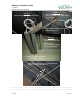
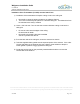
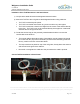
Check the revision level of the Tx/ATA. Different
revisions of the Tx/ATA may have been shipped
to the store. On the Tx/ATA there is a sticker
with the revision number on it.
Revision J or 3
must be installed in the stock room if
available.
Revision D, J or 3 can be installed
over the sales floor. Record the revision number
of the Tx/ATA and the location where it is
installed for the Help Desk.
Restrooms
Employee
Room
Pharmacy
Stock Room
Phone Block
Coolers
Employee Lockers
Office
Photo
Front Entrance
Cosmetics
Registers
Receiving
Door
Aisle 1
Aisle 2
Aisle 3
Aisle 4
Aisle 5
Aisle 6
Aisle 7
Aisle 8
Aisle 9
24
23
21
22
=Receiver =Transmitter =CMU =MEU =Power
The
Last digit
is the revision
number.