
User's Manual


Walgreens Installation Guide
G-1-2002-2B
Walgreens Installation Guide 2B.doc
Use or disclosure of this document is covered under the Non-Disclosure Agreement executed between the reader and Goliath Solutions,
LLC. This document and the information contained herein are privileged and should only be viewed by expressly authorized parties.
5/27/2008 Page: 2-54
Installation of the Rx/ARA over the Sales Floor:
1) At the designated location for the Rx/ARA make one hole using either an awl or #1
Phillips screwdriver in the exposed side of the ceiling tile. The hole should not be near
the edge of the ceiling tile so you don’t accidentally break the tile. The hole should be
a minimum of 6 inches from the edge of the tile.
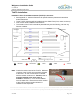
2) Push the Plastic mounting clip (Xmas tree fastener) into the exposed side of the tile
through the hole to the backside of the tile.
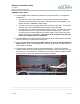
3) Lower the Rx/ARA onto the plastic mounting clip using one of the pre-drilled holes in
the bottom of its casing. Push the Rx/ARA onto the plastic mounting clip so that the
Rx/ARA is held firmly in place.
Be careful that the corner of the Rx/ARA containing plastic fastener be placed as
close to the marking on the floor as possible, as once the plastic fastener is
inserted into the ceiling tile, it cannot be removed without destroying the tile.
When attached the Rx/ARA can be rotated 360 degrees to adjust its position on
the ceiling tile.
Plastic
Mounting
Clip
Plastic Mounting Clip
installed in exposed
side of tile.
Plastic Mounting
Clip installed In
backside of tile.