
Operation Manual


FIRMWARE VERSION 1.0.7.76 GXV3140 USER MANUAL Page 21 of 151
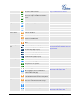
Account 3 Call Forward
busy or forward on no answer
Call Volume
Volume setting, ranges from 0 to 9. The
nine icons represent different volume
levels.
…
Ring Volume
Ring volume, ranges from 0 to 9
….
Phone Status
Camera disabled
Do-Not-Disturb (DND)
Missed Call. If there is a new missed
call, the icon will flicker.
Mute
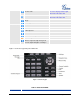
Screen Layout
Icon
First Desktop (Small Layout)
The Small/Big layout can be
selected in the Personalize->Screen
Layout menu.
Second Desktop (Small Layout)
First Desktop (Big Layout)
Second Desktop (Big Layout)
Third Desktop (Big Layout)
Fourth Desktop (Big Layout)
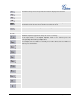
Audio Output
The headset is in use and is off hook
The headset is plugged in
The phone is on speaker
The handset is off hook
IM
IM is not logged in
The icon is displayed at the right
hand-side of the status bar.
IM is logging in; the icon will flicker
between blue and gray.
There is a new message on IM. The
icon will flicker between blue and yellow.
Applications
Text message. The icon will flicker if
there is a new unread text message.
Alarm clock
Media(music/video)Player
The icon is displayed at the right
hand-side of the status bar.