
Operation Manual


FIRMWARE VERSION 1.0.7.76 GXV3140 USER MANUAL Page 22 of 151
Internet radio
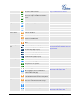
The icon is displayed at the right
hand-side of the status bar.
Web browser
The icon is displayed at the right
hand-side of the status bar.
Skype
Twitter Application
External devices
SD card
USB flash drive.
USB keyboard
USB mouse
USB wireless adapter detected
USB LED light
Wireless signal strength. Range from
0-4. The signal strength is currently 3.
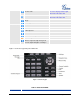
Figure 11 shows the keypad layout for GXV3140.
Figure 11: GXV3140 Keypad
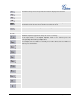
Table 6: GXV3140 KEYPAD
Key
Definition