
Operation Manual


FIRMWARE VERSION 1.0.7.76 GXV3140 USER MANUAL Page 25 of 151
Incoming calls through the three accounts will try to use the corresponding line. If this line is busy, the icon
for the line (top-left hand corner) will be green. When a call comes in and the line is busy, the next idle line
will be used while the icon for that line will flicker between blue and green.
HANDSET, SPEAKER AND HEADSET MODE
The GXV3140 allows users to switch from the handset to speaker or headset by pressing the Hook Flash,
the Headset FUNCTION button or the SPEAKER Button.
MAKING A CALL
There are several ways to make a call:
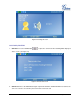
1. Enter the number
Take the handset off hook or use the speaker/headset. A dial tone is given; adjust account if
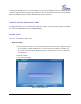
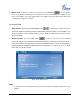
necessary by pressing the LINE button to select the desired account/line. (See figure 12)
The status of each Line will be displayed on the top, and the first one is the account being
used to dial out.
Enter the number.
Press the Send softkey.
Figure 12: GXV3140 Call Screen