
Instruction Manual





REMOTE CONTROL
27
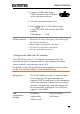
4. Enter the password using the
F1~F7 keys, as shown below, or
use the numeric keypad to enter
numbers:
7 8 9
654
1 2 3
/0
Limitations:
No spaces
Only 1~9, A~Z, a~z characters allowed
ABCDE
FGHIJ
KLMNO
PQRST
UVWXY
Z
A
C
D
E
B
Lowercase
Return
a
c
d
e
b
Return
LXI
Password>
Return
Menu tree to enter the password
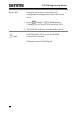
5. The password appears on the bottom of the
screen as it is created.
Password
6. Press
Enter
to confirm setting the password.