
User Manual




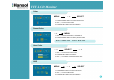

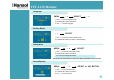
Table Of Contents

TFT-LCD Monitor
10
Language
MENU
– + SELECT – +
1. Use –,+ to move Language ICON.
2. Press SELECT button to select it.
3. Use –, + to select language.
Factory Reset
1. Use –,+ to move the Factory Reset ICON.
2. Press SELECT button to return to default setting
– + SELECT
Information
MENU
– + SELECT
1. Use –,+ to move the Information ICON.
2. Press SELECT button to select it.
You can know display information
* Accoding to the characteristic of video card, display information can be incorrect.
Sound(Option)
MENU
– + SELECT or VOL BUTTON
1. Use –,+ to move Sound ICON.
2. Press SELECT button to select it.
3. Use –,+ to control volume.