
User Manual


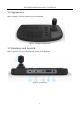
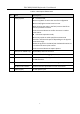
Table Of Contents

DS-1200KI/1006KI Keyboard User Manual
DS-6900UDI Decoder User Manual
3
Description of Rear Panel Table 1-1
SN
Item
Description
1
4-axis joystick
In menu mode,
Move to up/down to select the menu for confguration
Move to left/right to select items in menu.
When entering the value in the field, move to the left to
clear the previous character.
Press the central button to confirm the enter is used as
Enter button.
In shortcut operation mode,
Move the joystick to realize pan/tilt movement in 8
directions. And the PTZ speed is depending on the joystick
movement range.
Rotate the joystick in clockwise/anti-clockwise directions to
l to realize the zoom in/out control.
Press the central button to capture picture.
2
LAN (for DS-1200KI only)
10/100 Mbps Ethernet interface
3
RS-232 serial interface
Serial interface for debugging
4
USB interface
Universal Serial Bus (USB) port for additional devices such
as USB-flash disk
5
RS-422 serial interface
Connect with the matrix, video access gateway device, etc.
RS-485 serial interface
Connect with the speed dome unit for PTZ control
4
Power supply
12 VDC power input