
User Manual


UM DS-2CExxU8T-xxxx 042318NA 12
• Manual
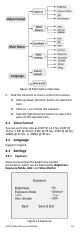
Click Iris+ to enter the submenu. Set the R Gain/B
Gain value from 1 to 255 to adjust the shades of
red/blue color of the image.
Figure 16 White Balance
• Natural
Set the white balance to Natural mode when large
parts of the monitoring scene is monochrome.
4.3.3 Day Night
Color, BW (Black White), and AUTO are selectable for
DAY and NIGHT switches.
• Color
The image is color in day mode all the time.
• B/W
The image is black and white all the time, and the
IR light turns on in poor light conditions.
• Auto
The image switches from color to B/W, or from
B/W to color, automatically according to the
lighting conditions.
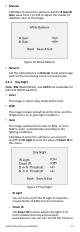
Click Iris+ to enter the submenu, you can turn
on/off the IR Light and set the value of Smart IR in
this menu.
Figure 17 Day Night
˗ IR Light
You can turn on/off the IR Light to meet the
requirements of different circumstances.
˗ Smart IR
The Smart IR function adjusts the light to its
most suitable intensity and prevents
overexposure. You can turn on/off this function.