
User Manual


UM DS-2CExxU8T-xxxx 042318NA 13
˗ D
N Threshold (Day to Night Threshold)
Day to Night Threshold controls the sensitivity
of switching the day mode to the night mode.
You can set the value from 1 to 9. The larger the
value, the more sensitive the camera.
˗ N
D Threshold (Night to Day Threshold)
Night to Day Threshold controls the sensitivity
of switching the night mode to the day mode.
You can set the value from 1 to 9. The larger the
value, the more sensitive the camera.
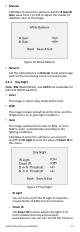
4.3.4 Video Settings
Move the cursor to Video Settings and click Iris+ to
enter the submenu. Contrast, Sharpness, Saturation,
3D DNR, Mirror, and Defog are adjustable.
Figure 18 Video Settings
• Contrast
This feature enhances the difference in color and
light between parts of an image. You can set the
Contrast value from 1 to 10.
• Sharpness
Determines the amount of detail an imaging
system can reproduce. You can set the Sharpness
value from 1 to 10.
• Saturation
Adjust this feature to change the saturation of the
color. The value ranges from 1 to 10.
• 3D DNR (Digital Noise Reduction)
The 3D DNR function can decrease the noise
effect, especially when capturing moving images in
poor light conditions, and deliver more accurate
and sharper image quality. You can set the 3D DNR
value from 1 to 10.
• Mirror
Off, H, V, and HV are selectable for mirror.
Off: The mirror function is disabled. H: The image
flips 180° horizontally. V: The image flips 180°
vertically.
HV: The image flips 180° both horizontally and
vertically.