
User Manual

UM DS-2CExxU8T-xxxx 042318NA 5
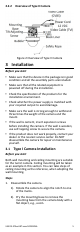
2.2.2 Overview of Type II Camera
Figure 2 Overview of Type II Camera
3 Installation
Before you start
• Make sure that the device in the package is in good
condition and all the assembly parts are included.
• Make sure that all the related equipment is
powered off during the installation.
• Check the specification of the products for the
installation environment.
• Check whether the power supply is matched with
your required output to avoid damage.
• Make sure the wall is strong enough to withstand
three times the weight of the camera and the
mount.
• If the wall is cement, insert expansion screws
before installing the camera. If the wall is wooden,
use self-tapping screw to secure the camera.
• If the product does not work properly, contact your
dealer or the nearest service center. Do NOT
disassemble the camera for repair or maintenance
yourself.
3.1
Type I Camera Installation
Before you start
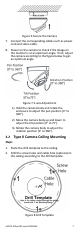
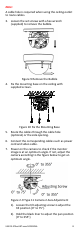
Both wall mounting and ceiling mounting are suitable
for the turret camera. Ceiling mounting will be taken
as an example in this section. You can take steps of
ceiling mounting as the reference, when adopting the
wall mounting.
Steps
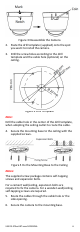
1. Disassemble the camera.
1). Rotate the camera to align the notch to one
of the marks.
2). Pry the mounting base to remove the
mounting base from the
c
amera body with a
flat object, e.g., a coin.