
User Manual

UM DS-2CExxU8T-xxxx 042318NA 8
Note:
A cable hole is required when using the ceiling outlet
to route cables.
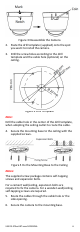
3. Loosen the set screws with a hex wrench
(supplied) to remove the bubble.
Figure 9 Remove the Bubble
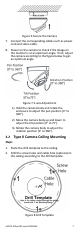
4. Fix the mounting base on the ceiling with
supplied screws.
Figure 10 Fix the Mounting Base
5. Route the cables through the cable hole
(optional) or the side opening.
6. Connect the corresponding cables such as power
cord and video cable.
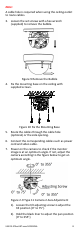
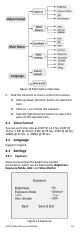
7. Power on the camera to check if the monitor
image is at an optimum angle. If not, adjust the
camera according to the figure below to get an
optimum angle.
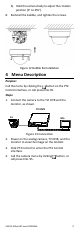
Figure 2-9 Type 11 Camera 2-Axis Adjustment
1). Loosen the tilt adjusting screw to adjust the
tilt position [0° to 75°].
2). Hold the black liner to adjust the pan position
[0° to 355°].