
User Manual
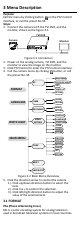


Table Of Contents

NTSC: (National Television System Committee)
NTSC is the analog television system that is used in
most of North America, parts of South America,
Myanmar, South Korea, etc.
3.2 LANGUAGE
Supports English, and Chinese.
3.3 WHITE LIGHT
The embedded white light source can be worked as the
visible alarm, or the lighting.
In the WHITE LIGHT mode, you can set the mode as
ALARM, LIGHTING, or OFF.
3.3.1 ALARM
When you select the WHITE LIGHT as ALARM, you can
set the parameters in the TRIGGER MODE, and the
ALARM MODE to meet your needs.
TRIGGER MODE
DVR
Select the TRIGGER MODE as DVR. In this way, the
alarm signal is sent from the DVR, and the camera
works as the alarm detector in the process. Besides, the
alarm type only supported by the DVR can also triggers
the visible alarm in the camera.
CAMERA
Select the TRIGGER MODE as CAMERA, the embedded
PIR module sends the alarm signal to the visible alarm
in the camera, when PIR module detected the alarm
source.
ALARM MODE
In the ALARM mode, you can select the ALARM MODE
as SOLID or FLASHING.
MENU
FORMAT
LANGUAGE
WHITE LIGHT
TRIGGER MODE
ALARM MODE
TIME SETTINGS
MAIN MENU
PAL
ENGLISH
ALARM
CAMERA
SOLID
5 S
Figure 3-3 ALARM MODE
SOLID
Select the ALARM MODE as SOLID. In this way, the
white light source turns on, when the PIR module
received the alarm signal.
In the TIME SETTING you can set the time as 5 s, 10 s,
15 s, 30 s, or 60 s, which means that the solid mode
stays for the set time when the camera received one
alarm signal.
Note:
The solid mode will be stayed for another set time
when second alarm signal is received, and the rest can
be done in the same way.
FLASHING
Select the ALARM MODE as FLASHING. In this way, the
white light source flashes when the PIR module
received the alarm signal.