
User Manual
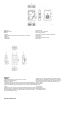
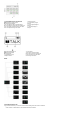
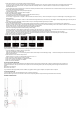


Table Of Contents

A
ASTATION
①Antenna Interface
②Up Key
③Left Key
④Menu/Confirm Key (Long Press to the Menu/ Short Press to Select)
⑤Right Key
⑥Down Key
⑦Power Button
⑧3/8 Screw Hole
⑨Interface for NP-F Type Battery
⑩Power Supply Interface
4-Wire Audio Input-Output Interface (RJ45 Interface)
USB Interface
3/8 Screw Hole
2-Wire Audio Input-Output Interface
POE Interface
B belt pack
①Antenna
②Mute/Talk Switch Key, Press Down for Talk, Up for Mute
③Battery Compartment Switcher
④USB Type-C Interface
⑤Left Key/A Group Key (The beltpack is not grouped when the indicator light is off.
The beltpack is joined Group A but is unable to talk or listen when the Indicator light
is white. The beltpack is able to talk and listen in Group A when the Indicator light is
orange)
⑥Menu/ B Group Key (Long press to enter Menu/The beltpack is not grouped when
the indicator light is off. The beltpack is joined Group B but is unable to talk or listen
when the Indicator light is white. The beltpack is able to talk and listen in Group B
when the Indicator light is orange)
⑦Right Key/C Group Key (The beltpack is not grouped when the
indicator light is off. The beltpack is joined Group C but is unable to
talk or listen when the Indicator light is white. The beltpack is able
to talk and listen in Group C when the Indicator light is orange)
⑧Volume+ Button
⑨Volume- Button
⑩Back Clip
Power Switcher
Charging Contact
LEMO Headset Interface
3.5mm Headset Interface
DISPLAY INTRODUCTION