
User Manual
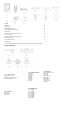
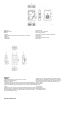
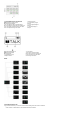
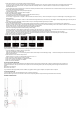


Table Of Contents

1. Station Installation
1. Install the antenna according to the picture.
2. Connect the power adapter, or install NP-F type battery.
3. Press the power button to power it on.
2. Beltpack Installation
1. Open the battery compartment, insert the battery in the direction marked on the battery.
2. Switch the power switcher on to power on.
3. After the beltpack status changes from “LOST” to “TALK”, You can Talk Now.
Press the top button will change to “MUTE”. The beltpack is able to listen but unable to talk. The status will be changed when the button is pressed again.
4. The beltpack supports both 3.5mm and LEMO headsets to connect.
5. When connect to other Intercom Systems through 4 Wire or 2 Wire Audio Interfaces, Users can adjust input and output gain in the Menu of the station to balance the entire gain of
the Intercom System.
6. The battery will enter the dormant state after being placed for a period of time. It is recommended to fully charge and discharge the beltpack for the first three times.
3. Re-Pair
The beltpack number may be lost due to wrong operation or other reasons. You can connect the beltpack to the station with a USB to Type-C cable. Enters the “Pair” Menu of the
beltpack and selects an optional number for pairing. Both the station and the beltpack’s screens will display “Pairing…”.Disconnect the beltpack from the station when the screens
display “Pairing Successful”.
4. Cascade Two Sets of Devices
1. Through the dedicated-level Ethernet cable in the accessories, Two Sets of stations can be cascaded, and the number of beltpacks can be expanded up to 16 Beltpacks. When
Cascading, One of the Master Device beeds to set as Slave Device. If set Master Device to Slave Device when used alone, the beltpack will not be able to talk and the device needs to
be reset as Master Device.
2. When cascading, the beltpack number of the Slave Device will automatically change to 9-16.
3. When the Master Device uses the POE adapter to supply power, the POE adapter needs to connect to the Power Interface of the Master Station. When cascading,
the Ethernet cable needs to connect to the POE Interface of the Master Device and the Power Interface of the Slave Device, which can realize the power supply to the Slave Device
without a Battery. It is available when the POE Adapter has not been used but NP-F Type Battery for the power supply.
PARAMETERS