
Install Instructions

8
• To add or remove RedLINK accessories
• To make changes to Installer Setup
• To perform an Installer Test
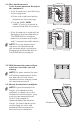
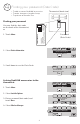
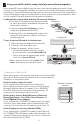
Finding your password
You can find the date code
on the back of the thermostat,
or
1 Touch Menu.
2 Select Dealer Information.
3 Scroll down to see the Date Code.
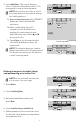
Linking RedLINK accessories to the
thermostat
1 Touch Menu.
2 Select Installer Options.
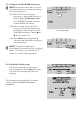
3 Enter password (date code) and
touch Done.
4 Select Wireless Manager.
MCR33980
Wireless Manager
Reset To Defaults
MCR33977
Enter password
0 0 0 0
MCR33976
Installer Options
MCR33975
TH8321R1001
Date Code: 1324
MCR34022
Dealer Information
Installer Options
4
Finding your password (Date Code)
M34164B
1-800-468-1502
Customer.Resideo
.com
Manufactured by Resideo Technologies, Inc.,
1985 Douglas Dr. N. Golden Valley, MN 55422
Country of origin: Mexico
Pays d’origine : Mexique
RoHS Compliant
Conformité RoHS
TH8321R1001
4
2126
M34161B
1-800-468-1502
Customer.Resideo
.com
Manufactured by Resideo Technologies, Inc.,
1985 Douglas Dr. N. Golden Valley, MN 55422
Country of origin: Mexico
Pays d’origine : Mexique
RoHS Compliant
Conformité RoHS
TH8321R1001
4
2126
Thermostat (back view)
Password
(Date Code)