
System Instruction
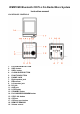
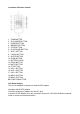
Table Of Contents

PRESET TUNING
1. Select your desired station according to the normal tuning procedure.
2. Press the MEMORY button, “P01” will appear and flash in the LCD, Then use SKIP+ /
SKIP- buttonto change the number where the station will be stored. (P01 to P20)
3. Store the current frequency by pressing MEMORY buttonagain when you get the
desired number.
4. Repeat the same procedure to set other desired frequencies into Memory No.1 to
NO.20
Note: The unit can be preset up to 20 stations.
MEMORY RECALL
Recall the stored frequencies by pressing M-or M+ button to select 1 to 20 stations as
desired
Bluetooth mode
You should follow several steps to connect your mobile phone
1. Activate Bluetooth from your mobile phone (please refer to your phone’s user’s manual)
2. Press the STANDBY BUTTON to turn on the unit, then press FUNCTION BUTTON repeatedly till “bt” indicator
appears on LCD display. it will be ready to pair automatically.
3. Use your mobile phone to search Bluetooth device with the name of “MC-030”.
4. Your mobile phone will find “MC-030”, and will have options to connect or not. Please connect it with the
password of “0000” (if any). When you successfully connect it, the Bluetooth indicator “bt” stop flashing on LCD
display.
Connecting with your phone Automatically
Pairing is only needed the first time the unit and phone are used together. When the unit
and phone have been paired once they will automatically connect when the unit is on and Bluetooth is
activated on the phone. The next time you power on, the unit will automatically connect the latest
phone that you connected.
Play from Bluetooth device
After successful Bluetooth connection, press the PLAY/PAUSE/M-button to play , Press SKIP -
or SKIP + button to skip the tracks backwards or forwards. To pause or resume play, press
PLAY/PAUSE/M- button again .