
System Instruction
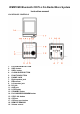
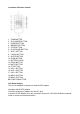
Table Of Contents

HANDING A COMPACT DISC
Always protect a disc against scratches, soil , dust and etc. If a disc is treated with
reasonable care, wiping off the disc with a soft cloth should be the only
maintenance needed to retain its excellent sound reproduction. Discs should be
retained in their original case during periods of non-use.
Handle a disc only by its edges, Do not touch the surface or rainbow-colored side of
the disc
Handle a disc as shown in the illustrations in this section
Use a soft cloth to wipe a disc clean. Do not use benzene, thinner, or other chemical
cleaners to clean the disc as damage may result. A disc should always be wiped in
a straight line from its center to its edge. Never wipe a disc in a circular motion.
Do not expose a disc to direct sunlight, high humidity, or high temperatures for
extended periods of time. Do not place the Disc on other equipment or near any
heat source.
Dust on the pickup lens can lead to erratic operation and interruption of the sound
during play. To clean the pickup lens, open the disc compartment and blow the dust
off . Using a camera lens blower(available at most camera stores)
Note: Do not touch the surface of the lens. Do not allow any liquids on the inside of
the product.
To clean the CD player cabinet, use a soft and damp cloth to wire off the exterior
surface.
Never use benzol, benzene, or other strong chemical cleaners, as these could
damage the finish.
PLAYING A COMPACT DISC (CD)
NOTE: Never touch the laser lens inside of the CD compartment. Clean the laser lens
with a CD cleaner disc if it becomes dirty.
1. Press the STANDBY buttonon the unit to turn of the unit the press FUNCTION
buttonrepeatedly, until the CD icon shown on the display
OR, press the STANDBY button on the remote to turn on the unit, then press the
FUNCTION button on the remote until the CD icon shown on the display
2. Open the CD DOOR by pressing the CD door open button and insert a CD into the
tray with printed label side facing up.
3. Close the CD DOOR and the disc will rotate for a few seconds and then play
automatically.
4. Use the SKIP+ / SKIP- button to choose a track
5. Press the PLAY/PAUSE/M- BUTTON again to PAUSE play.
6. Press the STOP/M+ BUTTON to STOP play.
7. To turn off the unit, press the STANDBY button on the remote once OR press the
STANDBY button on the unit, until the normal time shown on the display