
User Manual
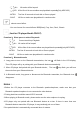
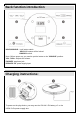


Table Of Contents

- ALL All tracks will be looped.
- DIR
All the files of the current album are played back repeatedly(Only MP3 DISC).
-INTRO The first 10 seconds of each title or file are played.
-SHUF All files or tracks are played back in random order.
:selecte sound effect.
-You can choose five sound effects: BBS(Bass), Pop, Jazz, Rock, Classic.
:(Just for CD player Model:CD611T)
Function 1:Short press to select Play mode
- 1 Current track loop Playback
- ALL All tracks will be looped
- DIR All the files of the current album are played back repeatedly(only MP3 DISC).
-INTRO The first 10 seconds of each title or file are played.
-SHUF All files or tracks are played back in random order
Function 2:Bluetooth mode
1. Long press to turn on the Bluetooth transmission, the icon will flash in the LCD display.
Then CD player will try to pairing with your Bluetooth device automatically.
2. When CD player had paired with your Bluetooth device, The icon stop flash ,you will hear
the music from your Bluetooth device.
3. In Bluetooth mode, long press to disconnect the Bluetooth transmitter, the Bluetooth icon
disappears.
Notes :
1.Before the CD player connects to the Bluetooth speaker/earphone, make sure that your
Bluetooth speaker/earphone is not connected to other devices.
2.Pairing lead time would be around 15-50 seconds.
3.When playing in Bluetooth mode, please make sure the wire earphone is unplug.
4.CD player only can paired with one Bluetooth device at a time. If there is more than one
Bluetooth device around the CD player, it may randomly pair one of them.
5.the paired device is automatically connected when it restarts.