
User Guide
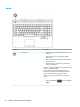

Special keys
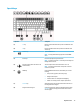
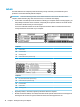
Component Description
(1) esc key Displays system information when pressed in combination with
the fn key.
(2) fn key Executes specic functions when pressed in combination with
another key.
(3) Windows key Opens the Start menu.
NOTE: Pressing the Windows key again will close the Start
menu.
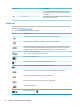
(4) Action keys Execute frequently used system functions.
NOTE: On select products, the f5 action key turns the keyboard
backlight feature o or on.
(5) Airplane mode key (also referred to as the
wireless button)
Turns the airplane mode and wireless feature on or o.
NOTE: A wireless network must be set up before a wireless
connection is possible.
(6) OMEN key Launches OMEN Command Center, which allows you to do the
following:
●
View processor, graphics, and memory usage
●
Manage network speed
●
Customize back cover and keyboard backlighting
●
Enable over-clocking to boost computer performance
(7) num lock key Alternates between the navigational and numeric functions on
the integrated numeric keypad.
(8) Integrated numeric keypad A separate keypad to the right of the alphabet keyboard. When
num lock is pressed, the keypad can be used like an external
numeric keypad.
Keyboard area 13