
User Guide

Component Description
NOTE: If the keypad function is active when the computer is
turned o, that function is reinstated when the computer is
turned back on.
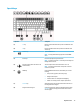
(9) num lock key Alternates between the navigational and numeric functions on
the integrated numeric keypad.
Action keys
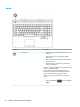
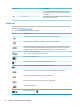
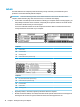
An action key performs the function indicated by the icon on the key. To determine which keys are on your
product, see Special keys on page 13.
▲
To use an action key, press and hold the key.
Icon Description
Decreases the screen brightness incrementally as long as you hold down the key.
Increases the screen brightness incrementally as long as you hold down the key.
Switches the screen image between display devices connected to the system. For example, if a monitor is
connected to the computer, repeatedly pressing this key alternates the screen image from the computer
display to the monitor display to a simultaneous display on both the computer and the monitor.
Turns the keyboard backlight o or on.
NOTE: To conserve battery power, turn o this feature.
Mutes or restores speaker sound.
Decreases speaker volume incrementally while you hold down the key.
Increases speaker volume incrementally while you hold down the key.
Plays the previous track of an audio CD or the previous section of a DVD or a Blu-ray Disc (BD).
Starts, pauses, or resumes playback of an audio CD, a DVD, or a BD.
Plays the next track of an audio CD or the next section of a DVD or a BD.
Turns the TouchPad o or on.
Disables the Windows key .
14 Chapter 2 Getting to know your computer