Getting Started Guide
Manuals
Brands
HP Manuals
Switch
HP 1920-16G Switch
11
12
13
14
15
16
17
18
19
20
16
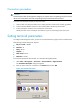
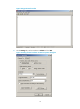
Figure 22
HyperTerminal window
6.
On the
Settings
tab, set the emulation to
VT100
and click
OK
.
Figure 23
Setting terminal emulation in
Switch Properties dialog box
1
...
...
18
19
20
21
22
...
...
35