
Intel Optane DC Persistent Memory - Configuration and Setup White Paper




19TECHNICAL WHITE PAPER
BIOS Post Errors Decoded
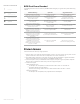
The following table shows some of most likely DCPMM-related messages you might see from system BIOS during
a reboot.
BIOS Error Message Implication Suggested Resolution
NVDIMMs are present with inaccessible
capacity. They may need to be recongured.
Not all capacity of the hardware
is available to be used.
Recongure the NVDIMMs in the system
to take all NVDIMM capacity.
Interleave set is in the wrong order.
Swap the DIMMs as follows:
The storage volume is not accessible
because the interleave set is not
congured correctly.
Turn the system o and arrange
the NVDIMMs as noted on the screen.
Interleave is missing the DIMM with
serial number: XXXX.
The storage volume is not accessible
because the interleave set is missing
a member NVDIMM.
Turn the system o and insert
the missing NVDIMM.
System memory conguration does not
support volatile memory on the NVDIMMs.
You need at least 1 DDR4 and 1 NVDIMM per
populated memory controller.
The system can utilize NVDIMMs in Memory
Mode, however Storage
mode is not available.
Recongure the NVDIMMs and DDR4 DIMMs
as outlined in this document.
The rmware version on the installed
NVDIMMs is not consistent. Please update all
NVDIMMs to the same rmware version.
There may be performance or functionality
issues with congured NVDIMMs.
Update the rmware on the NVDIMMs
to the latest revision.
S3 support has been disable because the
rmware version on one or more installed
NVDIMMs does not support S3. Please
update all NVDIMMs to the latest
rmware version.
The ability for the operating system
to go into Standby (S3) has been disabled.
Update the rmware on the NVDIMMs
to the latest revision.
The addressing capability of the installed
graphics card has caused the system
memory map to be truncated. As a result,
the NVDIMMs could not be properly
congured. You will need to remove some
memory or update to a newer graphics card.
The system is now halted.
The conguration of the NVDIMMs
is not valid or incorrect.
Reduce the memory in the system
or remove the incompatible graphics card(s).
Known Issues
These are some known issues you might experience.
1. When you boot up, you might see high CPU utilization on 25% to 75% of the cores in memory mode. This will
persist for about two to ten minutes. The x is expected in 20H1 version of Windows 10.
2. Some AMD Graphics cards have a 1TB system memory limit. See HP QuickSpecs for graphics card details.
System limit includes the total memory capacity of DCPMM and DRAM memory.
3. If more total system memory is installed than the CPU supports, the system might not operate as expected.
Remove memory until below the CPU memory limit then congure the system.
4. Limited Linux support.
• Red Hat Enterprise Linux
°
The Filesystem Dax mode (fsdax) is in Feature Preview mode in RHEL 7.6+ and RHEL 8.0.
°
Full Support will likely come with RHEL 8.1.
°
At the time of this writing, fsdax will remain in Feature Preview mode in the RHEL 7.x stream.
• SUSE Linux Enterprise
°
The Filesystem Dax mode (fsdax) is only supported with the zfs lesystem.
CONTENTS & NAVIGATION
1
Introduction
5
DCPMM Security
Overview
System Requirements
6
System Setup Overview
8
Appendices