
Maintenance and Service Guide
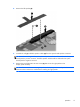
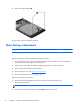
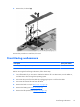
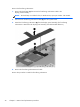
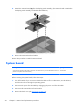
Table Of Contents

Remove the front-facing webcamera:
1. Remove the shield tape (1) that secures the front-facing webcamera cable to the
display panel assembly.
NOTE: The shield tape is included in the I/O Hardware Kit, spare part number 745164-001.
2. Disconnect the front-facing webcamera cable (2) from the system board.
3. Detach the front-facing webcamera (3) from the display panel assembly. (The front-facing
webcamera is attached to the display panel assembly with double-sided adhesive.)
4. Remove the front-facing webcamera and cable.
Reverse this procedure to install the front-facing webcamera.
22 Chapter 5 Removal and replacement procedures