HP Color LaserJet Enterprise Flow MFP M880 - User Guide
Manuals
Brands
HP Manuals
Desktops
HP Color LaserJet Enterprise flow MFP M880z+
61
62
63
64
65
66
67
68
69
70
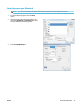
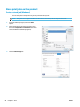
7.
Select the op
tion for the type of paper y
ou are
using, and then click the
OK
button.
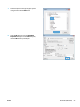
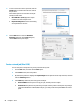
8.
Click the
OK
button t
o close the
Document
Properties
dial
og box. In the
Print
dial
og box,
click the
OK
button t
o print the job
.
ENWW
Print tasks (Windo
ws)
53
1
...
...
61
62
63
64
65
...
...
200