
HP Color LaserJet Enterprise Flow MFP M880 - User Guide
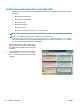
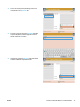
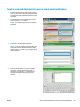

5. Complete the CC:, Subject:, and File Name: elds
by touching the eld and using the touchscreen
keyboard to enter information. Touch the OK
button when you have completed the elds.
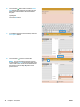
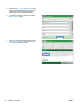
6. To change the settings for the document touch
the More Options button.
7. If you are sending a two-sided document, select
the Original Sides menu, and then select the 2–
sided option. Touch the OK button.
80 Chapter 6 Scan/send ENWW