HP Color LaserJet Enterprise Flow MFP M880 - User Guide
Manuals
Brands
HP Manuals
Desktops
HP Color LaserJet Enterprise flow MFP M880z+
91
92
93
94
95
96
97
98
99
100
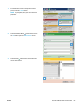
3.
T
ouch the Addres
s Book
button that is next t
o
the
T
o:
eld
to open the
Addr
ess Book
screen.
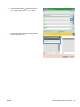
4.
From the dr
op-down list, sel
ect the addres
s book
view that y
ou want t
o use.
ENWW
Use the addre
ss book to send email
85
1
...
...
93
94
95
96
97
...
...
200